

Overview
The Journal is a block-based editor (like Notion) with one difference that matters: trading blocks are bound to your real trades and fetch live data — the numbers in your notes never go stale. URL:/journal · Requires the Basic plan or higher.
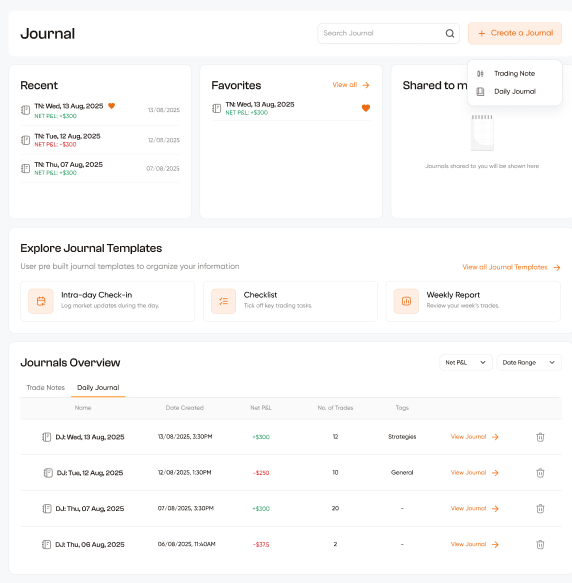
Two kinds of note
- Daily journal — the story of a trading day.
- Trade note — a case file about one or a few trades. It starts by attaching trades from a picker (the last two weeks on your current account mode); its stats — net P&L, win rate, biggest win — recompute live from exactly those trades. Each trade note carries a verdict: Keep / Fix / Cut, plus one honest line of why.
Live blocks (slash commands)
Type/ in the editor:
Plus all the standard blocks: headings, lists, to-dos, toggles, callouts, tables, quotes, code, columns, images.
Templates
The template shelf on the Journal home seeds new notes — every preview is the note it creates, and live blocks fill with your real numbers. Save any note as a template (⋯ menu → Save as template…), and set one as the default for new notes.Versions, tags, sharing
- Every meaningful save snapshots a version (last 40 kept); restore any of them from the right rail — restoring snapshots the replaced state too, so nothing is lost.
- Tags are edited right on the note’s meta band; the library filters by them.
- Covers: preset colors or Unsplash search. Image uploads: images only, max 10 MB.
The rail
Beside the note on a wide screen, and behind the Details button in the top bar on anything narrower, sits the rail: About this note. It is read from your trades, not part of the note: the page’s headings, the attached trades, the bot behind them, and the note’s version history.Sharing
The Share button opens one sheet with four ways out:- Person — send the note to an email address. It opens in their Journal under Shared, read from your trades exactly as you see it. A shared note can’t be edited by its reader; Save a copy · your trades gives them an editable note of their own with the text kept and every figure rewired to their trades. If the recipient has no account yet, the note waits and attaches when they sign up.
- Link — a public page anyone can read, off by default. You choose what it shows: your trade figures (net, win rate, the attached trades and the blocks, marked Verified because they were read from the broker, never a balance), your bot names, and whether readers may save a copy. Turning the link off breaks it and every embed. The sheet shows how many times it was read.
- Embed — one iframe for a website: author, title, opening lines and the verified strip, then “Read the whole note”. It follows the host page’s light or dark setting.
- Card — the picture the link unfurls with in Telegram, X, Discord, WhatsApp and the rest, made from the note: wide for previews and feeds, square for Instagram, Threads and Telegram posts. Copy it, download it, or set it as the link’s preview.
- Community — in the feed’s composer, the attach picker has a Note tab. Attaching a note turns its link on with your Link switches, and the post carries the note as a card: the proof strip, the cover, title, opening lines and four figures, with “Read the note” and “Save a copy”. The card reads from the note’s public projection, so the feed never shows more than the link would; turn the link off and the card says the note is no longer shared. The note’s rail shows “Posted to Community” with the post’s likes and comments.
The ledger and discipline strip
The Journal home’s ledger shows journaled vs silent days — including the win-rate and P&L difference between them — your current journaling streak, and nudges for trading days with no note. All figures follow the Live/Demo toggle.Journaling feeds your TDF score: completing a journal or your daily checklist earns daily Habit points.