Documentation Index
Fetch the complete documentation index at: https://docs.traderframe.io/llms.txt
Use this file to discover all available pages before exploring further.
Overview
This guide walks you through every step from opening the app for the first time to reaching your dashboard — covering registration, email verification, login, forgot password, and the live/demo account mode toggle.Complete Auth Flow Diagram
Module 1 — Register
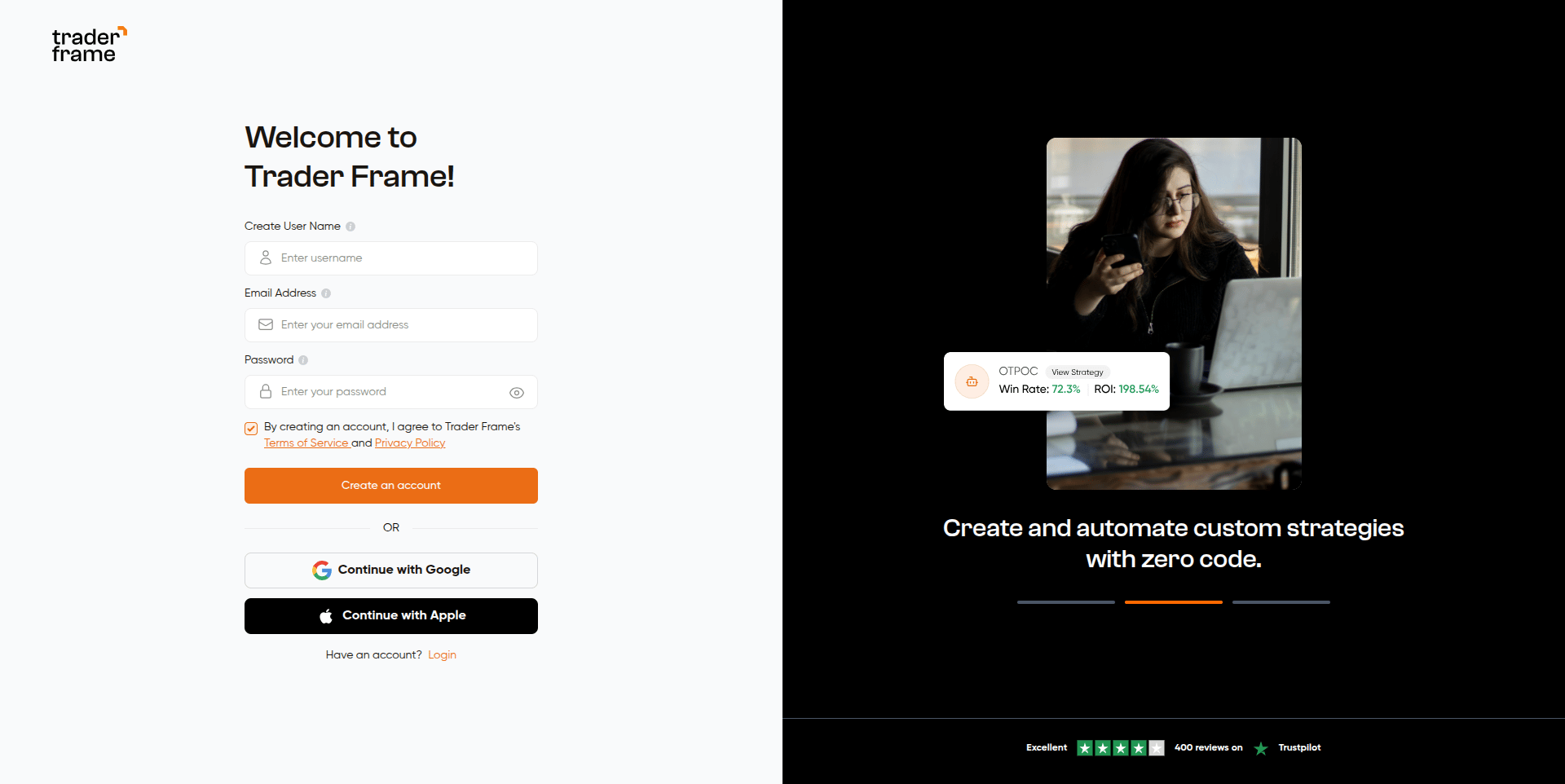
URL:/auth/register

Form Fields
| Field / Element | Details |
|---|---|
| Create User Name | Minimum 2 characters |
| Email Address | Must be a valid email format |
| Password | Minimum 6 characters. Toggle eye icon to show/hide |
| Terms checkbox | Must be checked — submit button is disabled if unchecked |
| Create an account | Primary submit button. Shows spinner while loading |
| Continue with Google | OAuth popup via Google |
| Continue with Apple | OAuth popup via Apple |
| Login link | ”Have an account? Login” → navigates to /auth/login |
Step-by-step
Fill in your details
Enter a username (min 2 characters), your email address, and a
password (min 6 characters).
Accept Terms
Check the Terms of Service and Privacy Policy checkbox. The submit
button stays disabled until this is checked.
Submit
Click Create an account. The button shows a loading spinner while the
request is in progress. All other buttons (Google, Apple) are also disabled
during this time.
Validation Rules
| Field | Rule | Error |
|---|---|---|
| Username | Min 2 characters | ”Name must be at least 2 characters” |
| Valid email format | ”Invalid email address” | |
| Password | Min 6 characters | ”Password must be at least 6 characters” |
| Terms | Must be checked | ”Please accept the Terms of Service and Privacy Policy” |
Module 2 — Email Verification
URL:/auth/email-verification

What’s on this page
| Element | Details |
|---|---|
| Email display | Shows the address the verification link was sent to |
| Resend Verification Email | Sends a fresh email if the first wasn’t received |
| Back to Registration | Logs out and returns to /auth/register |
Verification Flow
Already Verified?
If the user’s email is already verified (detected via FirebaseonAuthStateChanged), the page shows:
“Your email is already verified!”And redirects to
/dashboard after 1.5 seconds automatically.
Module 3 — Login
URL:/auth/login

Form Fields
| Field / Element | Details |
|---|---|
| Email Address | Valid email required |
| Password | Min 6 characters. Eye icon toggles visibility |
| Remember Me | Checked by default. Persists your session |
| Forgot Password? | Link → /auth/forgot-password |
| Login | Primary submit button |
| Sign in with Google | OAuth popup |
| Sign in with Apple | OAuth popup |
| Signup link | ”Don’t have an account? Signup” → /auth/register |
Step-by-step
Redirect Logic
Validation Rules
| Field | Rule | Error |
|---|---|---|
| Required + valid format | ”Email is required” / “Invalid email address” | |
| Password | Required + min 6 chars | ”Password is required” / “Password must be at least 6 characters” |
Module 4 — Forgot Password
URL:/auth/forgot-password

What’s on this page
| Element | Details |
|---|---|
| Email Address | Enter the email linked to your account |
| Recover Account | Sends a password reset link to your inbox |
| Back arrow | Returns to /auth/login |
| Back to Login | Text link at the bottom |
Step-by-step
Check your inbox
A green success message appears:
“Password reset email sent to your@email.com. Please check your inbox and follow the instructions.”
Open the email and click the reset link.Module 5 — Live vs Demo Mode
Location: Top navigation bar (visible after login)

What it does
After logging in, a Live / Demo toggle appears in the top navigation bar. This single switch controls what data is shown across the entire app — Dashboard, Portfolio, Performance, Journal, and Bots all respond to the selected mode.| Mode | Visual Indicator | Data Shown |
|---|---|---|
| Demo | Default orange theme | Paper trading / simulated broker account |
| Live | Upgrade button turns green | Real broker account, real funds |
How to switch
Click Live or Demo in the top navigation bar. The switch is instant — all sections update immediately with no page reload.All Auth Routes — Quick Reference
| Route | Purpose | Access Control |
|---|---|---|
/auth/register | New user sign up | Guests only (logged-in users → /dashboard) |
/auth/email-verification | Verify email after registration | Open |
/auth/login | Sign in | Guests only (logged-in users → /dashboard) |
/auth/forgot-password | Request password reset link | Open |
/auth/reset-password | Set new password via email link | Open |