> ## Documentation Index
> Fetch the complete documentation index at: https://docs.traderframe.io/llms.txt
> Use this file to discover all available pages before exploring further.
# Profile Settings
> Manage your account profile, security, and email notification preferences
## Overview
The **Profile Settings** page lets you update your personal information, reset your password, and control your email notification preferences.
**URL:** `/profile-settings`
***
## Page Layout
The page uses a left sidebar with two sections:
```
┌────────────────────┬──────────────────────────────┐
│ SIDEBAR │ CONTENT AREA │
│ - General │ (changes per tab) │
│ - Email │ │
│ Preferences │ │
└────────────────────┴──────────────────────────────┘
```
***
## Tab 1 — General
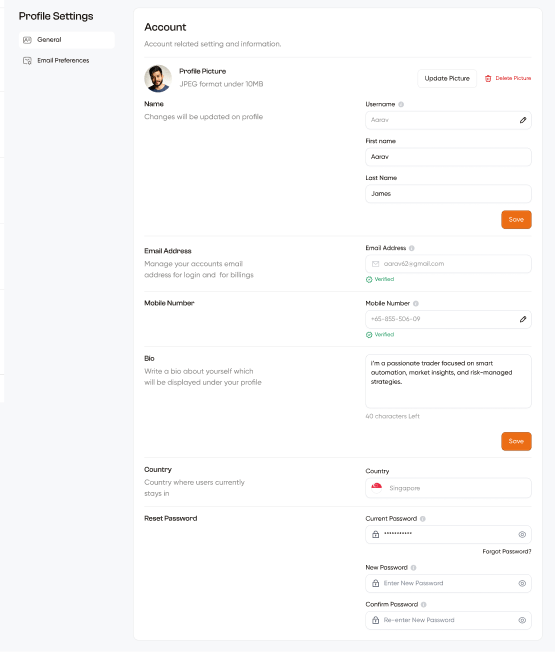 **Account** — Account related setting and information.
### Profile Picture
| Element | Description |
| ------------------- | --------------------------------------------- |
| **Profile Picture** | Your current avatar (JPEG format, under 10MB) |
| **Update Picture** | Upload a new profile photo |
| **Delete Picture** | Remove your current photo |
### Name
| Field | Description |
| -------------- | ---------------------------------------------------------------------------- |
| **Username** | Your display name on the platform — editable with ✏ pencil icon (e.g. Aarav) |
| **First name** | Your first name (e.g. Aarav) |
| **Last Name** | Your last name (e.g. James) |
| **Save** | Save name changes |
### Email Address
| Field | Description |
| ------------------ | ----------------------------------------------------------------------------------------------------- |
| **Email Address** | Your registered email used for login and billing (e.g. [aarav52@gmail.com](mailto:aarav52@gmail.com)) |
| **Verified badge** | ✓ Verified shown in green when email is confirmed |
### Mobile Number
| Field | Description |
| ------------------ | ------------------------------------------------------------------------------------------------ |
| **Mobile Number** | Your verified phone number with country code (e.g. +65-885-506-09) — editable with ✏ pencil icon |
| **Verified badge** | ✓ Verified shown in green |
### Bio
A text area to write a short bio about yourself — displayed under your profile on the community and leaderboard.
* Character count shown (e.g. "40 characters left")
* **Save** button to apply bio changes
### Country
| Field | Description |
| ----------- | ----------------------------------------------------------------- |
| **Country** | Your country of residence shown with a flag (e.g. 🇸🇬 Singapore) |
### Reset Password
| Field | Description |
| -------------------- | ------------------------------------------------------------------------------------ |
| **Current Password** | Enter your existing password to verify identity. **Forgot Password?** link available |
| **New Password** | Enter your new password |
| **Confirm Password** | Re-enter new password to confirm |
***
## Tab 2 — Email Preferences
**Account** — Account related setting and information.
### Profile Picture
| Element | Description |
| ------------------- | --------------------------------------------- |
| **Profile Picture** | Your current avatar (JPEG format, under 10MB) |
| **Update Picture** | Upload a new profile photo |
| **Delete Picture** | Remove your current photo |
### Name
| Field | Description |
| -------------- | ---------------------------------------------------------------------------- |
| **Username** | Your display name on the platform — editable with ✏ pencil icon (e.g. Aarav) |
| **First name** | Your first name (e.g. Aarav) |
| **Last Name** | Your last name (e.g. James) |
| **Save** | Save name changes |
### Email Address
| Field | Description |
| ------------------ | ----------------------------------------------------------------------------------------------------- |
| **Email Address** | Your registered email used for login and billing (e.g. [aarav52@gmail.com](mailto:aarav52@gmail.com)) |
| **Verified badge** | ✓ Verified shown in green when email is confirmed |
### Mobile Number
| Field | Description |
| ------------------ | ------------------------------------------------------------------------------------------------ |
| **Mobile Number** | Your verified phone number with country code (e.g. +65-885-506-09) — editable with ✏ pencil icon |
| **Verified badge** | ✓ Verified shown in green |
### Bio
A text area to write a short bio about yourself — displayed under your profile on the community and leaderboard.
* Character count shown (e.g. "40 characters left")
* **Save** button to apply bio changes
### Country
| Field | Description |
| ----------- | ----------------------------------------------------------------- |
| **Country** | Your country of residence shown with a flag (e.g. 🇸🇬 Singapore) |
### Reset Password
| Field | Description |
| -------------------- | ------------------------------------------------------------------------------------ |
| **Current Password** | Enter your existing password to verify identity. **Forgot Password?** link available |
| **New Password** | Enter your new password |
| **Confirm Password** | Re-enter new password to confirm |
***
## Tab 2 — Email Preferences
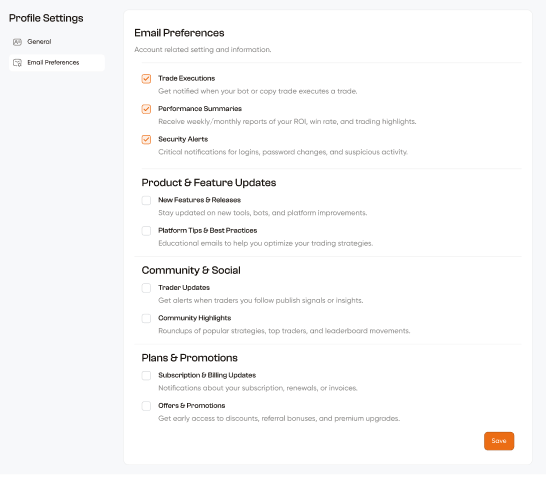 **Email Preferences** — Account related setting and information.
Control which email notifications TraderFrame sends you. Each item has a checkbox to enable or disable. A **Save** button at the bottom applies all changes.
### Trading Activity
| Notification | Description |
| --------------------------- | ---------------------------------------------------------------------------- |
| **Trade Executions** ✓ | Get notified when your bot or copy trade executes a trade |
| **Performance Summaries** ✓ | Receive weekly/monthly reports of your ROI, win rate, and trading highlights |
| **Security Alerts** ✓ | Critical notifications for logins, password changes, and suspicious activity |
*(Checked by default)*
### Product & Feature Updates
| Notification | Description |
| ---------------------------------- | --------------------------------------------------------------- |
| **New Features & Releases** | Stay updated on new tools, bots, and platform improvements |
| **Platform Tips & Best Practices** | Educational emails to help you optimize your trading strategies |
*(Unchecked by default)*
### Community & Social
| Notification | Description |
| ------------------------ | ---------------------------------------------------------------------- |
| **Trader Updates** | Get alerts when traders you follow publish signals or insights |
| **Community Highlights** | Roundups of popular strategies, top traders, and leaderboard movements |
*(Unchecked by default)*
### Plans & Promotions
| Notification | Description |
| ---------------------------------- | --------------------------------------------------------------------- |
| **Subscription & Billing Updates** | Notifications about your subscription, renewals, or invoices |
| **Offers & Promotions** | Get early access to discounts, referral bonuses, and premium upgrades |
*(Unchecked by default)*
***
## Phone Number Verification
Adding or changing your phone number triggers a verification flow:
```
Enter phone number → Click "Send OTP"
│
▼
OTP sent to the number via SMS
│
▼
Enter the 6-digit OTP
│
▼
Phone number verified — ✓ Verified badge appears
```
A verified phone number is required before you can connect your first broker account. See [Brokers](/user-guide/brokers) for details.
**Email Preferences** — Account related setting and information.
Control which email notifications TraderFrame sends you. Each item has a checkbox to enable or disable. A **Save** button at the bottom applies all changes.
### Trading Activity
| Notification | Description |
| --------------------------- | ---------------------------------------------------------------------------- |
| **Trade Executions** ✓ | Get notified when your bot or copy trade executes a trade |
| **Performance Summaries** ✓ | Receive weekly/monthly reports of your ROI, win rate, and trading highlights |
| **Security Alerts** ✓ | Critical notifications for logins, password changes, and suspicious activity |
*(Checked by default)*
### Product & Feature Updates
| Notification | Description |
| ---------------------------------- | --------------------------------------------------------------- |
| **New Features & Releases** | Stay updated on new tools, bots, and platform improvements |
| **Platform Tips & Best Practices** | Educational emails to help you optimize your trading strategies |
*(Unchecked by default)*
### Community & Social
| Notification | Description |
| ------------------------ | ---------------------------------------------------------------------- |
| **Trader Updates** | Get alerts when traders you follow publish signals or insights |
| **Community Highlights** | Roundups of popular strategies, top traders, and leaderboard movements |
*(Unchecked by default)*
### Plans & Promotions
| Notification | Description |
| ---------------------------------- | --------------------------------------------------------------------- |
| **Subscription & Billing Updates** | Notifications about your subscription, renewals, or invoices |
| **Offers & Promotions** | Get early access to discounts, referral bonuses, and premium upgrades |
*(Unchecked by default)*
***
## Phone Number Verification
Adding or changing your phone number triggers a verification flow:
```
Enter phone number → Click "Send OTP"
│
▼
OTP sent to the number via SMS
│
▼
Enter the 6-digit OTP
│
▼
Phone number verified — ✓ Verified badge appears
```
A verified phone number is required before you can connect your first broker account. See [Brokers](/user-guide/brokers) for details.