> ## Documentation Index
> Fetch the complete documentation index at: https://docs.traderframe.io/llms.txt
> Use this file to discover all available pages before exploring further.
# Dashboard
> Your command center — a complete overview of your trading setup, performance, market data, and news
## Overview
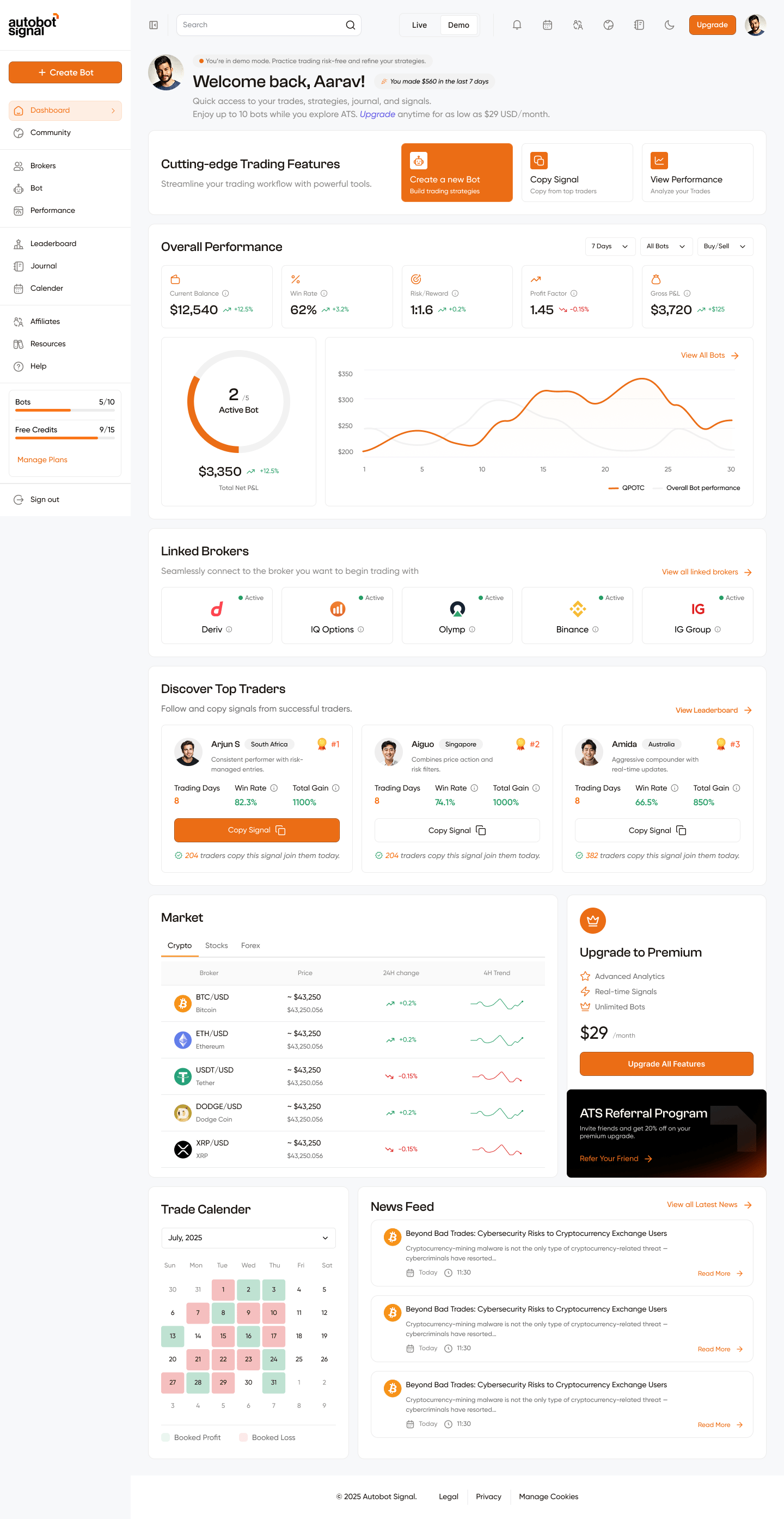
The **Dashboard** is the first page you see after logging in. It adapts to your onboarding state — showing setup guidance for new users and full analytics for users with brokers and bots connected.
**URL:** `/dashboard`
Here is the full dashboard at a glance:
 ***
## Dashboard Layout Flow
```
┌─────────────────────────────────────────────────────────────────┐
│ DASHBOARD PAGE │
└─────────────────────────────────────────────────────────────────┘
┌─────────────────────────────────────────────────────────────┐
│ HEADER │
│ New user: "Welcome aboard, [Name] 👋" │
│ Returning: Avatar + "Welcome back, [Name]!" + earnings │
└─────────────────────────────────────────────────────────────┘
│
▼
┌─────────────────────────────────────────────────────────────┐
│ ONBOARDING STEPS BANNER (hidden once all 3 steps done) │
│ Step 1: Verify Email → Step 2: Connect Broker → │
│ Step 3: Create Bot │
└─────────────────────────────────────────────────────────────┘
│
▼
┌─────────────────────────────────────────────────────────────┐
│ CUTTING-EDGE TRADING FEATURES (3 quick-action cards) │
│ [Create a new Bot] [Copy Signal] [View Performance] │
└─────────────────────────────────────────────────────────────┘
│
▼
┌─────────────────────────────────────────────────────────────┐
│ OVERALL PERFORMANCE │
│ Stats: Balance | Win Rate | Risk/Reward | Profit Factor │
│ | Gross P&L │
│ Charts: Active Bot Radial + Performance Line Chart │
│ Filters: Period | Bot | Signal direction │
└─────────────────────────────────────────────────────────────┘
│
▼
┌─────────────────────────────────────────────────────────────┐
│ CONNECT BROKER BANNER (only when no broker connected) │
└─────────────────────────────────────────────────────────────┘
│
▼
┌─────────────────────────────────────────────────────────────┐
│ LINKED BROKERS │
│ Grid of connected brokers + status + Add Broker card │
└─────────────────────────────────────────────────────────────┘
│
▼
┌─────────────────────────────────────────────────────────────┐
│ DISCOVER TOP TRADERS │
│ 3 trader cards with stats + Copy Signal button │
└─────────────────────────────────────────────────────────────┘
── only after all 3 onboarding steps are complete ───────────
│
▼
┌────────────────────────────────┬────────────────────────────┐
│ MARKET │ UPGRADE PREMIUM │
│ Live prices: Crypto/Stock/ │ Plan upsell + Referral │
│ Forex with 4h sparkline trend │ │
└────────────────────────────────┴────────────────────────────┘
│
▼
┌────────────────────────────────┬────────────────────────────┐
│ TRADE CALENDAR │ NEWS FEED │
│ Monthly calendar coloured │ Forex/Crypto/Stock news │
│ green=profit / red=loss │ from live sources │
└────────────────────────────────┴────────────────────────────┘
```
***
## Section 1 — Header
The header sits at the very top of the dashboard content area and shows a personalised greeting. It has two different states depending on whether you've completed onboarding.
### State A — New User (Onboarding Incomplete)
Shown when any of the 3 setup steps are still pending.
***
## Dashboard Layout Flow
```
┌─────────────────────────────────────────────────────────────────┐
│ DASHBOARD PAGE │
└─────────────────────────────────────────────────────────────────┘
┌─────────────────────────────────────────────────────────────┐
│ HEADER │
│ New user: "Welcome aboard, [Name] 👋" │
│ Returning: Avatar + "Welcome back, [Name]!" + earnings │
└─────────────────────────────────────────────────────────────┘
│
▼
┌─────────────────────────────────────────────────────────────┐
│ ONBOARDING STEPS BANNER (hidden once all 3 steps done) │
│ Step 1: Verify Email → Step 2: Connect Broker → │
│ Step 3: Create Bot │
└─────────────────────────────────────────────────────────────┘
│
▼
┌─────────────────────────────────────────────────────────────┐
│ CUTTING-EDGE TRADING FEATURES (3 quick-action cards) │
│ [Create a new Bot] [Copy Signal] [View Performance] │
└─────────────────────────────────────────────────────────────┘
│
▼
┌─────────────────────────────────────────────────────────────┐
│ OVERALL PERFORMANCE │
│ Stats: Balance | Win Rate | Risk/Reward | Profit Factor │
│ | Gross P&L │
│ Charts: Active Bot Radial + Performance Line Chart │
│ Filters: Period | Bot | Signal direction │
└─────────────────────────────────────────────────────────────┘
│
▼
┌─────────────────────────────────────────────────────────────┐
│ CONNECT BROKER BANNER (only when no broker connected) │
└─────────────────────────────────────────────────────────────┘
│
▼
┌─────────────────────────────────────────────────────────────┐
│ LINKED BROKERS │
│ Grid of connected brokers + status + Add Broker card │
└─────────────────────────────────────────────────────────────┘
│
▼
┌─────────────────────────────────────────────────────────────┐
│ DISCOVER TOP TRADERS │
│ 3 trader cards with stats + Copy Signal button │
└─────────────────────────────────────────────────────────────┘
── only after all 3 onboarding steps are complete ───────────
│
▼
┌────────────────────────────────┬────────────────────────────┐
│ MARKET │ UPGRADE PREMIUM │
│ Live prices: Crypto/Stock/ │ Plan upsell + Referral │
│ Forex with 4h sparkline trend │ │
└────────────────────────────────┴────────────────────────────┘
│
▼
┌────────────────────────────────┬────────────────────────────┐
│ TRADE CALENDAR │ NEWS FEED │
│ Monthly calendar coloured │ Forex/Crypto/Stock news │
│ green=profit / red=loss │ from live sources │
└────────────────────────────────┴────────────────────────────┘
```
***
## Section 1 — Header
The header sits at the very top of the dashboard content area and shows a personalised greeting. It has two different states depending on whether you've completed onboarding.
### State A — New User (Onboarding Incomplete)
Shown when any of the 3 setup steps are still pending.
 | Element | Details |
| ----------------- | -------------------------------------------------- |
| **Greeting** | "Welcome aboard, \[Name] 👋" |
| **Sparkle badge** | "Kickstart your journey with ATS today!" |
| **Subtitle** | "Let's set up your first trade in 3 simple steps." |
### State B — Returning User (Onboarding Complete)
Shown after all 3 onboarding steps are done.
| Element | Details |
| ----------------- | -------------------------------------------------- |
| **Greeting** | "Welcome aboard, \[Name] 👋" |
| **Sparkle badge** | "Kickstart your journey with ATS today!" |
| **Subtitle** | "Let's set up your first trade in 3 simple steps." |
### State B — Returning User (Onboarding Complete)
Shown after all 3 onboarding steps are done.
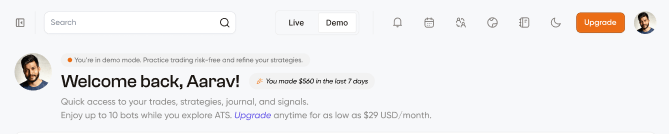 | Element | Details |
| ------------------ | ------------------------------------------------------------------------------------------------------------------- |
| **Avatar** | Your profile picture, or initials fallback if no image |
| **Mode badge** | Orange dot: "You're in demo mode. Practice trading risk-free and refine your strategies." / Green dot for Live mode |
| **Greeting** | "Welcome back, \[Name]!" |
| **Earnings badge** | "You made \$X in the last 7 days" |
| **Description** | "Quick access to your trades, strategies, journal, and signals." |
| **Upgrade link** | "Upgrade anytime for as low as \$29 USD/month" → `/pricing` |
The name shown is your `firstName` from your profile. If not set, it falls
back to your `userName`.
***
## Section 2 — Onboarding Steps Banner
| Element | Details |
| ------------------ | ------------------------------------------------------------------------------------------------------------------- |
| **Avatar** | Your profile picture, or initials fallback if no image |
| **Mode badge** | Orange dot: "You're in demo mode. Practice trading risk-free and refine your strategies." / Green dot for Live mode |
| **Greeting** | "Welcome back, \[Name]!" |
| **Earnings badge** | "You made \$X in the last 7 days" |
| **Description** | "Quick access to your trades, strategies, journal, and signals." |
| **Upgrade link** | "Upgrade anytime for as low as \$29 USD/month" → `/pricing` |
The name shown is your `firstName` from your profile. If not set, it falls
back to your `userName`.
***
## Section 2 — Onboarding Steps Banner
 This banner appears automatically for new users who have not yet completed all 3 setup steps. It disappears permanently once all steps are done, or you can dismiss it temporarily by clicking the **✕** button in the top-right corner.
### The 3 Steps
```
[ Verify Email ✓ ] → [ Connect Broker ] → [ 3. Create Bot ]
Step 1 Step 2 (active) Step 3 (locked)
```
| Step | Trigger | What Happens |
| -------------------------- | ---------------- | ---------------------------------------------------------- |
| **Step 1: Verify Email** | Automatic | Marked done after email is verified. Not clickable |
| **Step 2: Connect Broker** | Click the button | Opens the Connect Broker modal |
| **Step 3: Create Bot** | Click the button | Creates a new bot and redirects to `/create-bot?botId=...` |
### Step Visual States
| State | Appearance | Behaviour |
| ---------- | ------------------------------------------- | ------------------------------------------------------- |
| **Done** | Green border, green text, green ✓ checkmark | Not clickable |
| **Active** | Orange border, dark text | Clickable — triggers the action |
| **Locked** | Grey border, faded text, 60% opacity | Disabled — cannot click until previous step is complete |
Steps must be completed in order. You cannot create a bot before connecting a
broker.
***
## Section 3 — Cutting-Edge Trading Features
This banner appears automatically for new users who have not yet completed all 3 setup steps. It disappears permanently once all steps are done, or you can dismiss it temporarily by clicking the **✕** button in the top-right corner.
### The 3 Steps
```
[ Verify Email ✓ ] → [ Connect Broker ] → [ 3. Create Bot ]
Step 1 Step 2 (active) Step 3 (locked)
```
| Step | Trigger | What Happens |
| -------------------------- | ---------------- | ---------------------------------------------------------- |
| **Step 1: Verify Email** | Automatic | Marked done after email is verified. Not clickable |
| **Step 2: Connect Broker** | Click the button | Opens the Connect Broker modal |
| **Step 3: Create Bot** | Click the button | Creates a new bot and redirects to `/create-bot?botId=...` |
### Step Visual States
| State | Appearance | Behaviour |
| ---------- | ------------------------------------------- | ------------------------------------------------------- |
| **Done** | Green border, green text, green ✓ checkmark | Not clickable |
| **Active** | Orange border, dark text | Clickable — triggers the action |
| **Locked** | Grey border, faded text, 60% opacity | Disabled — cannot click until previous step is complete |
Steps must be completed in order. You cannot create a bot before connecting a
broker.
***
## Section 3 — Cutting-Edge Trading Features
 Three quick-action cards that give one-click access to the most common tasks. The active card (hovered) turns fully orange with white text and a white icon.
| Card | Icon | Subtitle | Action |
| -------------------- | -------------- | -------------------------- | -------------------------------------------------- |
| **Create a new Bot** | Robot/bot icon | "Build trading strategies" | Creates a new bot record → `/create-bot?botId=...` |
| **Copy Signal** | Copy icon | "Copy from top traders" | → `/leaderboard` |
| **View Performance** | Chart icon | "Analyze your Trades" | → `/performance` |
***
## Section 4 — Overall Performance
Three quick-action cards that give one-click access to the most common tasks. The active card (hovered) turns fully orange with white text and a white icon.
| Card | Icon | Subtitle | Action |
| -------------------- | -------------- | -------------------------- | -------------------------------------------------- |
| **Create a new Bot** | Robot/bot icon | "Build trading strategies" | Creates a new bot record → `/create-bot?botId=...` |
| **Copy Signal** | Copy icon | "Copy from top traders" | → `/leaderboard` |
| **View Performance** | Chart icon | "Analyze your Trades" | → `/performance` |
***
## Section 4 — Overall Performance
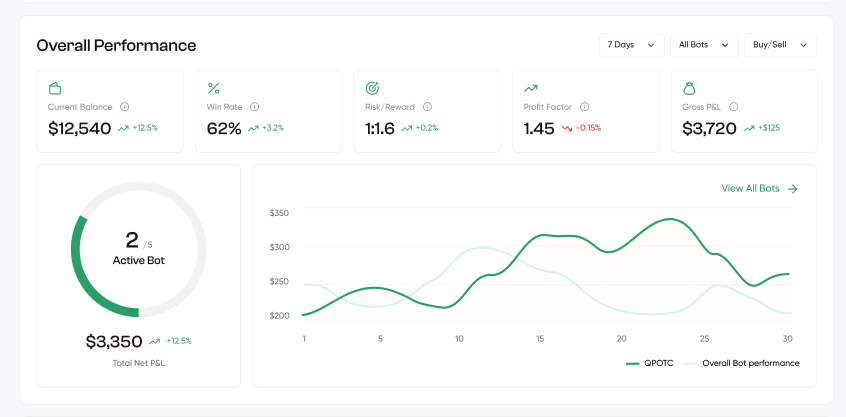 The main analytics widget on the dashboard. Shows aggregated performance data across all your bots for the selected period.
### Filters (Top-Right)
Three dropdowns let you slice the data. Any change immediately re-fetches all stats and charts.
| Filter | Options | Default |
| ---------- | --------------------------------------- | -------- |
| **Period** | 7 Days, 1 Month, 6 Months, 1 Year | 7 Days |
| **Bot** | All Bots, or any individual bot by name | All Bots |
| **Signal** | Buy/Sell, Buy, Sell | Buy/Sell |
### 5 Stats Cards
| # | Metric | Example | Description |
| - | ------------------- | ----------------- | ------------------------------------------------------ |
| 1 | **Current Balance** | \$12,540 ↑ +12.5% | Total account balance with % change vs previous period |
| 2 | **Win Rate** | 62% ↑ +3.2% | Percentage of trades closed in profit |
| 3 | **Risk/Reward** | 1:1.6 ↑ +0.2% | Reward relative to risk per trade |
| 4 | **Profit Factor** | 1.45 ↓ -0.15% | Gross profit ÷ gross loss |
| 5 | **Gross P\&L** | $3,720 ↑ +$125 | Total revenue before fees |
Each card has a trend arrow — **green ↑** for improvement, **red ↓** for decline.
### Active Bot Radial Chart (Left)
| Element | Details |
| ---------- | ------------------------------------------------- |
| **Ring** | Fills proportionally: `active bots / total bots` |
| **Center** | Large number = active bots, `/5` = total bots |
| **Label** | "Active Bot" |
| **Below** | Total Net P\&L with trend (e.g. \$3,350 ↑ +12.5%) |
| **Color** | Orange when bots are active, grey when none |
### Bot Performance Line Chart (Right)
Two lines plotted over time:
| Line | Color | Shows |
| -------------------------------- | ---------------- | ----------------------- |
| **Selected Bot** (or "All Bots") | Orange (primary) | PnL of your chosen bot |
| **Overall Bot Performance** | Light grey | Average across all bots |
* X-axis: dates (e.g. 1, 5, 10, 15, 20, 25, 30)
* Y-axis: dollar values ($200–$350 range in example)
* Hovering shows a tooltip with exact date and dollar value per series
* **"View All Bots →"** link in the top-right navigates to `/bot`
* If no data exists: shows empty state icon with "No performance data available"
***
## Section 5 — Connect Broker Banner
The main analytics widget on the dashboard. Shows aggregated performance data across all your bots for the selected period.
### Filters (Top-Right)
Three dropdowns let you slice the data. Any change immediately re-fetches all stats and charts.
| Filter | Options | Default |
| ---------- | --------------------------------------- | -------- |
| **Period** | 7 Days, 1 Month, 6 Months, 1 Year | 7 Days |
| **Bot** | All Bots, or any individual bot by name | All Bots |
| **Signal** | Buy/Sell, Buy, Sell | Buy/Sell |
### 5 Stats Cards
| # | Metric | Example | Description |
| - | ------------------- | ----------------- | ------------------------------------------------------ |
| 1 | **Current Balance** | \$12,540 ↑ +12.5% | Total account balance with % change vs previous period |
| 2 | **Win Rate** | 62% ↑ +3.2% | Percentage of trades closed in profit |
| 3 | **Risk/Reward** | 1:1.6 ↑ +0.2% | Reward relative to risk per trade |
| 4 | **Profit Factor** | 1.45 ↓ -0.15% | Gross profit ÷ gross loss |
| 5 | **Gross P\&L** | $3,720 ↑ +$125 | Total revenue before fees |
Each card has a trend arrow — **green ↑** for improvement, **red ↓** for decline.
### Active Bot Radial Chart (Left)
| Element | Details |
| ---------- | ------------------------------------------------- |
| **Ring** | Fills proportionally: `active bots / total bots` |
| **Center** | Large number = active bots, `/5` = total bots |
| **Label** | "Active Bot" |
| **Below** | Total Net P\&L with trend (e.g. \$3,350 ↑ +12.5%) |
| **Color** | Orange when bots are active, grey when none |
### Bot Performance Line Chart (Right)
Two lines plotted over time:
| Line | Color | Shows |
| -------------------------------- | ---------------- | ----------------------- |
| **Selected Bot** (or "All Bots") | Orange (primary) | PnL of your chosen bot |
| **Overall Bot Performance** | Light grey | Average across all bots |
* X-axis: dates (e.g. 1, 5, 10, 15, 20, 25, 30)
* Y-axis: dollar values ($200–$350 range in example)
* Hovering shows a tooltip with exact date and dollar value per series
* **"View All Bots →"** link in the top-right navigates to `/bot`
* If no data exists: shows empty state icon with "No performance data available"
***
## Section 5 — Connect Broker Banner
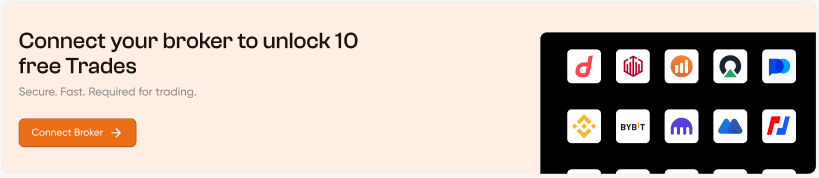 Shown only when **no broker is connected yet**. A full-width warm-toned banner with:
| Element | Details |
| -------------------- | ---------------------------------------------- |
| **Heading** | "Connect your broker to unlock 10 free Trades" |
| **Subtitle** | "Secure. Fast. Required for trading." |
| **Connect Broker →** | Orange button — opens the Connect Broker modal |
| **Right side** | Preview collage of supported broker logos |
Clicking the button opens the **Connect Broker Modal** which then leads to the **Connect Broker Sidebar** (slide-over panel) where you authorize a specific broker.
***
## Section 6 — Linked Brokers
Visible in the full dashboard screenshot — shows all your connected broker accounts in a grid.
### Broker Card
Each connected broker appears as a card:
| Element | Details |
| ------------- | ----------------------------------------- |
| **Logo** | Broker's logo image |
| **Name** | Broker name (e.g. Deriv, Binance, Bitget) |
| **Status** | Top-right: 🟢 **Active** or 🟡 **Paused** |
| **Info icon** | ⓘ for additional broker details |
### Header Actions
| Element | Destination |
| ------------------------------- | ---------------------------------------- |
| **"View all linked brokers →"** | `/brokers` — full broker management page |
### Connect Flow (when adding a new broker)
```
Click "Add Broker" or connect button
│
▼
Connect Broker Modal
(shows intro + confirms intent)
│
│ Click "Connect"
▼
Connect Broker Sidebar (slide-over)
(select broker → authorize via OAuth or API key)
│
│ On close:
├── Re-fetches linked brokers list
└── Re-fetches profile to update step completion status
```
***
## Section 7 — Discover Top Traders
Shown only when **no broker is connected yet**. A full-width warm-toned banner with:
| Element | Details |
| -------------------- | ---------------------------------------------- |
| **Heading** | "Connect your broker to unlock 10 free Trades" |
| **Subtitle** | "Secure. Fast. Required for trading." |
| **Connect Broker →** | Orange button — opens the Connect Broker modal |
| **Right side** | Preview collage of supported broker logos |
Clicking the button opens the **Connect Broker Modal** which then leads to the **Connect Broker Sidebar** (slide-over panel) where you authorize a specific broker.
***
## Section 6 — Linked Brokers
Visible in the full dashboard screenshot — shows all your connected broker accounts in a grid.
### Broker Card
Each connected broker appears as a card:
| Element | Details |
| ------------- | ----------------------------------------- |
| **Logo** | Broker's logo image |
| **Name** | Broker name (e.g. Deriv, Binance, Bitget) |
| **Status** | Top-right: 🟢 **Active** or 🟡 **Paused** |
| **Info icon** | ⓘ for additional broker details |
### Header Actions
| Element | Destination |
| ------------------------------- | ---------------------------------------- |
| **"View all linked brokers →"** | `/brokers` — full broker management page |
### Connect Flow (when adding a new broker)
```
Click "Add Broker" or connect button
│
▼
Connect Broker Modal
(shows intro + confirms intent)
│
│ Click "Connect"
▼
Connect Broker Sidebar (slide-over)
(select broker → authorize via OAuth or API key)
│
│ On close:
├── Re-fetches linked brokers list
└── Re-fetches profile to update step completion status
```
***
## Section 7 — Discover Top Traders
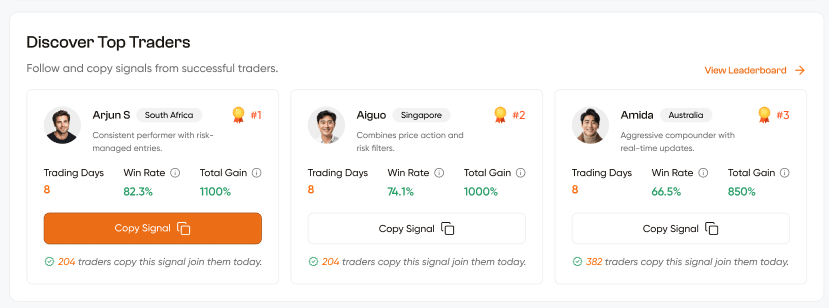 Shows the **top 3 ranked traders** from the leaderboard directly on your dashboard. Clicking any card or the Copy Signal button navigates to that trader's full profile.
### Trader Card Elements
| Element | Details |
| ----------------- | --------------------------------------------------------------- |
| **Avatar** | Profile picture or default placeholder |
| **Name** | Trader's username (e.g. Arjun S, Aiguo, Amida) |
| **Country** | Country badge (e.g. South Africa, Singapore, Australia) |
| **Rank** | 🥇 medal icon + `#1`, `#2`, `#3` in orange |
| **Bio** | Short description of the trader's style |
| **Trading Days** | Number of days active on the platform |
| **Win Rate** | % in green with ⓘ info icon |
| **Total Gain** | % in green (positive) or red (negative) with ⓘ icon |
| **Copy Signal** | Orange button for rank #1, outlined for others → trader profile |
| **Copiers count** | "✓ X traders copy this signal join them today." |
**"View Leaderboard →"** in the top-right navigates to `/leaderboard`.
***
## Section 8 — Market
Shows the **top 3 ranked traders** from the leaderboard directly on your dashboard. Clicking any card or the Copy Signal button navigates to that trader's full profile.
### Trader Card Elements
| Element | Details |
| ----------------- | --------------------------------------------------------------- |
| **Avatar** | Profile picture or default placeholder |
| **Name** | Trader's username (e.g. Arjun S, Aiguo, Amida) |
| **Country** | Country badge (e.g. South Africa, Singapore, Australia) |
| **Rank** | 🥇 medal icon + `#1`, `#2`, `#3` in orange |
| **Bio** | Short description of the trader's style |
| **Trading Days** | Number of days active on the platform |
| **Win Rate** | % in green with ⓘ info icon |
| **Total Gain** | % in green (positive) or red (negative) with ⓘ icon |
| **Copy Signal** | Orange button for rank #1, outlined for others → trader profile |
| **Copiers count** | "✓ X traders copy this signal join them today." |
**"View Leaderboard →"** in the top-right navigates to `/leaderboard`.
***
## Section 8 — Market
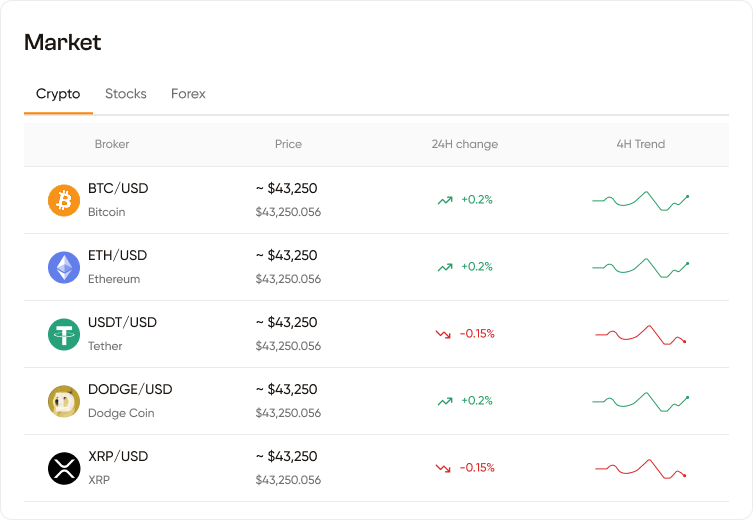 A live market data table powered by a **real-time WebSocket** connection to the backend. Only shown after all 3 onboarding steps are complete.
### Asset Tabs
| Tab | Asset Class | Data |
| ---------- | -------------- | ------------------------------- |
| **Crypto** | Cryptocurrency | BTC, ETH, USDT, DOGE, XRP, etc. |
| **Stocks** | US equities | Major stock symbols |
| **Forex** | Currency pairs | Major forex pairs |
The active tab is underlined in orange. Switching tabs reconnects the WebSocket for the new category.
### Table Columns
| Column | Description |
| -------------- | ------------------------------------------------------------------- |
| **Broker** | Trading pair symbol (e.g. BTC/USD) + full name below (e.g. Bitcoin) |
| **Price** | Live price as `~ $X,XXX.XX` with exact raw price below |
| **24H Change** | % change with ↗ green arrow (gain) or ↘ red arrow (loss) |
| **4H Trend** | Mini sparkline chart — green line = uptrend, red line = downtrend |
## Section 9 — Trade Calendar & News Feed
A live market data table powered by a **real-time WebSocket** connection to the backend. Only shown after all 3 onboarding steps are complete.
### Asset Tabs
| Tab | Asset Class | Data |
| ---------- | -------------- | ------------------------------- |
| **Crypto** | Cryptocurrency | BTC, ETH, USDT, DOGE, XRP, etc. |
| **Stocks** | US equities | Major stock symbols |
| **Forex** | Currency pairs | Major forex pairs |
The active tab is underlined in orange. Switching tabs reconnects the WebSocket for the new category.
### Table Columns
| Column | Description |
| -------------- | ------------------------------------------------------------------- |
| **Broker** | Trading pair symbol (e.g. BTC/USD) + full name below (e.g. Bitcoin) |
| **Price** | Live price as `~ $X,XXX.XX` with exact raw price below |
| **24H Change** | % change with ↗ green arrow (gain) or ↘ red arrow (loss) |
| **4H Trend** | Mini sparkline chart — green line = uptrend, red line = downtrend |
## Section 9 — Trade Calendar & News Feed
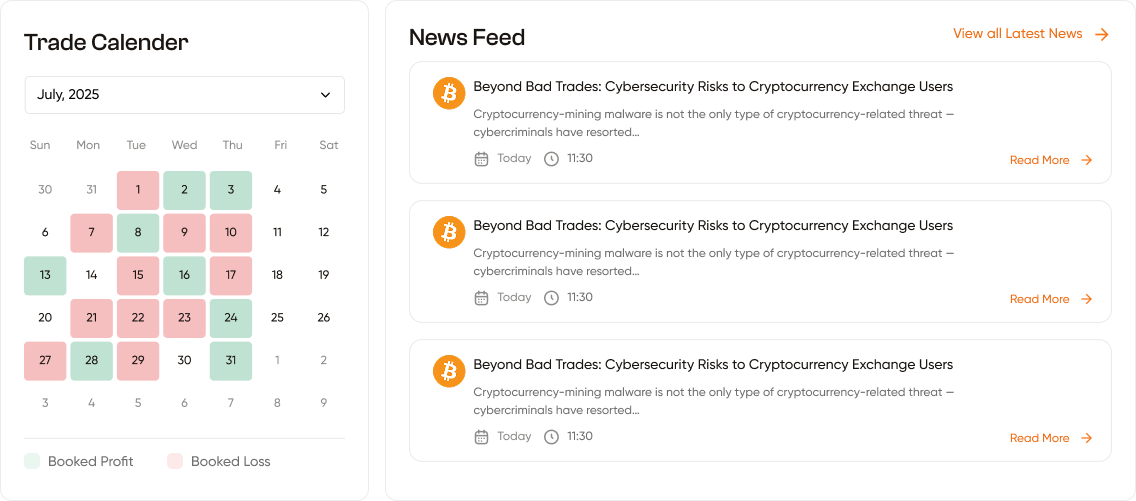 These two widgets appear side-by-side at the bottom of the dashboard, only after onboarding is complete.
### Trade Calendar (Left — 1/4 width)
A monthly calendar that colour-codes each day by your trading outcome.
| Colour | Meaning |
| --------------- | ---------------------------------------- |
| 🟩 **Green** | Net profitable day (`netPnL >= 0`) |
| 🟥 **Red/Pink** | Net losing day (`netPnL < 0`) |
| **No colour** | No trades placed that day |
| **Faded** | Days outside the current month (padding) |
**Month Selector** — dropdown at the top lets you browse any month from January of the current year to the current month.
**Legend** at the bottom:
* 🟩 Booked Profit
* 🟥 Booked Loss
The calendar automatically updates when you switch between **Live** and **Demo** mode.
### News Feed (Right — 3/4 width)
A live scrollable news feed covering Forex, Crypto, and Stock news.
| Element | Details |
| --------------- | -------------------------------------------------- |
| **Source logo** | Circular logo of the news publisher |
| **Headline** | Article title |
| **Summary** | Short 1–2 line description |
| **Date** | "Today" for today's news, or "MMM D" (e.g. May 12) |
| **Time** | Published time in your local timezone (HH:mm) |
| **Read More →** | Opens the full article in a new browser tab |
**"View all Latest News →"** link in the top-right of the section header.
***
## Quick Navigation from Dashboard
| Click Target | Goes To |
| ------------------------- | ---------------------------------- |
| Create a new Bot card | `/create-bot?botId=...` |
| Copy Signal card | `/leaderboard` |
| View Performance card | `/performance` |
| View All Bots link | `/bot` |
| View Leaderboard link | `/leaderboard` |
| Trader card / Copy Signal | `/leaderboard/trader-profile/[id]` |
| View all linked brokers | `/brokers` |
| Upgrade link | `/pricing` |
| News Read More | External article URL (new tab) |
These two widgets appear side-by-side at the bottom of the dashboard, only after onboarding is complete.
### Trade Calendar (Left — 1/4 width)
A monthly calendar that colour-codes each day by your trading outcome.
| Colour | Meaning |
| --------------- | ---------------------------------------- |
| 🟩 **Green** | Net profitable day (`netPnL >= 0`) |
| 🟥 **Red/Pink** | Net losing day (`netPnL < 0`) |
| **No colour** | No trades placed that day |
| **Faded** | Days outside the current month (padding) |
**Month Selector** — dropdown at the top lets you browse any month from January of the current year to the current month.
**Legend** at the bottom:
* 🟩 Booked Profit
* 🟥 Booked Loss
The calendar automatically updates when you switch between **Live** and **Demo** mode.
### News Feed (Right — 3/4 width)
A live scrollable news feed covering Forex, Crypto, and Stock news.
| Element | Details |
| --------------- | -------------------------------------------------- |
| **Source logo** | Circular logo of the news publisher |
| **Headline** | Article title |
| **Summary** | Short 1–2 line description |
| **Date** | "Today" for today's news, or "MMM D" (e.g. May 12) |
| **Time** | Published time in your local timezone (HH:mm) |
| **Read More →** | Opens the full article in a new browser tab |
**"View all Latest News →"** link in the top-right of the section header.
***
## Quick Navigation from Dashboard
| Click Target | Goes To |
| ------------------------- | ---------------------------------- |
| Create a new Bot card | `/create-bot?botId=...` |
| Copy Signal card | `/leaderboard` |
| View Performance card | `/performance` |
| View All Bots link | `/bot` |
| View Leaderboard link | `/leaderboard` |
| Trader card / Copy Signal | `/leaderboard/trader-profile/[id]` |
| View all linked brokers | `/brokers` |
| Upgrade link | `/pricing` |
| News Read More | External article URL (new tab) |