> ## Documentation Index
> Fetch the complete documentation index at: https://docs.traderframe.io/llms.txt
> Use this file to discover all available pages before exploring further.
# Community
> Share insights, follow traders, join groups, and collaborate with the trading community
## Overview
The **Community** is TraderFrame's social hub. Post trading insights, follow other traders, join or create groups, comment on posts, and share market analysis with the community.
**URL:** `/community`
***
## Community Page Layout
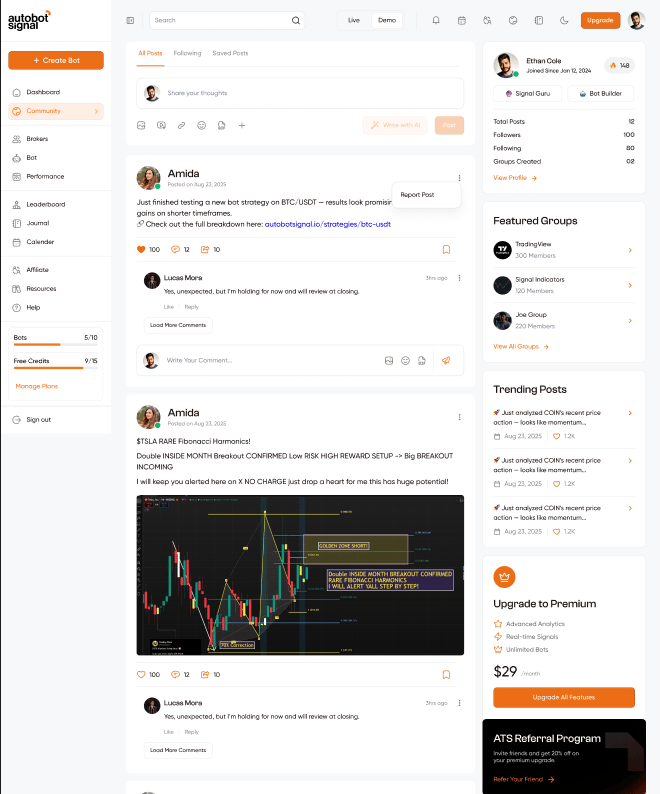 ```
┌───────────────────────────────────────────────────────────┐
│ MAIN FEED AREA │ RIGHT SIDEBAR │
│ │ - Your profile card │
│ [ Post Tabs ] │ - Featured Groups │
│ All Posts | Following | Saved│ - Trending Posts │
│ │ - Upgrade to Premium │
│ [ Post Composer ] │ - ATS Referral Program │
│ │ │
│ [ Post Feed — infinite scroll] │
└───────────────────────────────────────────────────────────┘
```
***
## Feed Tabs
| Tab | Description |
| --------------- | ----------------------------------- |
| **All Posts** | Posts from everyone on the platform |
| **Following** | Posts only from traders you follow |
| **Saved Posts** | Posts you have bookmarked |
Switching tabs immediately reloads the feed. Posts load via **infinite scroll** as you reach the bottom.
***
## Post Composer
```
┌───────────────────────────────────────────────────────────┐
│ MAIN FEED AREA │ RIGHT SIDEBAR │
│ │ - Your profile card │
│ [ Post Tabs ] │ - Featured Groups │
│ All Posts | Following | Saved│ - Trending Posts │
│ │ - Upgrade to Premium │
│ [ Post Composer ] │ - ATS Referral Program │
│ │ │
│ [ Post Feed — infinite scroll] │
└───────────────────────────────────────────────────────────┘
```
***
## Feed Tabs
| Tab | Description |
| --------------- | ----------------------------------- |
| **All Posts** | Posts from everyone on the platform |
| **Following** | Posts only from traders you follow |
| **Saved Posts** | Posts you have bookmarked |
Switching tabs immediately reloads the feed. Posts load via **infinite scroll** as you reach the bottom.
***
## Post Composer
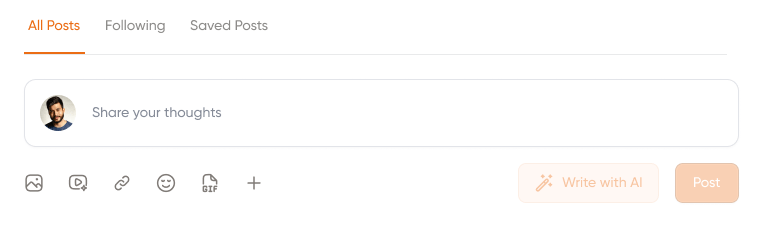 Create a new post from the composer at the top of the feed:
| Element | Description |
| ------------- | ------------------------------------------------ |
| **Text area** | "Share your thoughts" — click to write your post |
| **Image** | Attach an image to your post |
| **Video** | Attach a video |
| **Link** | Add a URL link |
| **Emoji** | Insert an emoji |
| **GIF** | Attach a GIF |
| **+ (More)** | Additional attachment options |
| **Post** | Publish the post to the feed |
***
## Post Card
Each post in the feed shows:
| Element | Description |
| ----------------- | --------------------------------------------------------- |
| **Avatar + Name** | Author's profile picture and username |
| **Posted date** | When the post was published (e.g. Posted on Aug 23, 2025) |
| **Content** | Post text, links, and any attached images or charts |
| **❤ Likes** | Like count (e.g. 100) |
| **💬 Comments** | Comment count (e.g. 12) — click to open thread |
| **↩ Share** | Share count (e.g. 10) |
| **Bookmark** | Save the post to Saved Posts |
| **⋮ Menu** | **Report Post** option |
### Comments
Each post shows its latest comment inline. Clicking **Load More Comments** expands the full thread. You can write a comment inline with emoji, image, GIF, and send options.
***
## Right Sidebar
| Section | Description |
| ------------------------ | --------------------------------------------------------------------------------------------------------------------------------------------------------- |
| **Your Profile card** | Your avatar, name, join date, ATS score badge, role tags (Signal Guru, Bot Builder), Total Posts, Followers, Following, Groups Created, View Profile link |
| **Featured Groups** | Quick links to top groups (e.g. TradingView 300 Members, Signal Indicators 120 Members, Joe Group 220 Members) with a **View All Groups →** link |
| **Trending Posts** | Latest trending posts with date and like count |
| **Upgrade to Premium** | Premium plan CTA — Advanced Analytics, Real-time Signals, Unlimited Bots — \$29/month with **Upgrade All Features** button |
| **ATS Referral Program** | Invite friends and get 20% off your premium upgrade — **Refer Your Friend →** link |
***
## Community Ban Alert
If your account has been banned from the community, a banner is shown at the top:
> "You have been banned from the Community and cannot interact with posts."
You can still browse and read posts, but all interactive actions (like, comment, post, share) are disabled.
***
## Community Groups (`/community/groups`)
Create a new post from the composer at the top of the feed:
| Element | Description |
| ------------- | ------------------------------------------------ |
| **Text area** | "Share your thoughts" — click to write your post |
| **Image** | Attach an image to your post |
| **Video** | Attach a video |
| **Link** | Add a URL link |
| **Emoji** | Insert an emoji |
| **GIF** | Attach a GIF |
| **+ (More)** | Additional attachment options |
| **Post** | Publish the post to the feed |
***
## Post Card
Each post in the feed shows:
| Element | Description |
| ----------------- | --------------------------------------------------------- |
| **Avatar + Name** | Author's profile picture and username |
| **Posted date** | When the post was published (e.g. Posted on Aug 23, 2025) |
| **Content** | Post text, links, and any attached images or charts |
| **❤ Likes** | Like count (e.g. 100) |
| **💬 Comments** | Comment count (e.g. 12) — click to open thread |
| **↩ Share** | Share count (e.g. 10) |
| **Bookmark** | Save the post to Saved Posts |
| **⋮ Menu** | **Report Post** option |
### Comments
Each post shows its latest comment inline. Clicking **Load More Comments** expands the full thread. You can write a comment inline with emoji, image, GIF, and send options.
***
## Right Sidebar
| Section | Description |
| ------------------------ | --------------------------------------------------------------------------------------------------------------------------------------------------------- |
| **Your Profile card** | Your avatar, name, join date, ATS score badge, role tags (Signal Guru, Bot Builder), Total Posts, Followers, Following, Groups Created, View Profile link |
| **Featured Groups** | Quick links to top groups (e.g. TradingView 300 Members, Signal Indicators 120 Members, Joe Group 220 Members) with a **View All Groups →** link |
| **Trending Posts** | Latest trending posts with date and like count |
| **Upgrade to Premium** | Premium plan CTA — Advanced Analytics, Real-time Signals, Unlimited Bots — \$29/month with **Upgrade All Features** button |
| **ATS Referral Program** | Invite friends and get 20% off your premium upgrade — **Refer Your Friend →** link |
***
## Community Ban Alert
If your account has been banned from the community, a banner is shown at the top:
> "You have been banned from the Community and cannot interact with posts."
You can still browse and read posts, but all interactive actions (like, comment, post, share) are disabled.
***
## Community Groups (`/community/groups`)
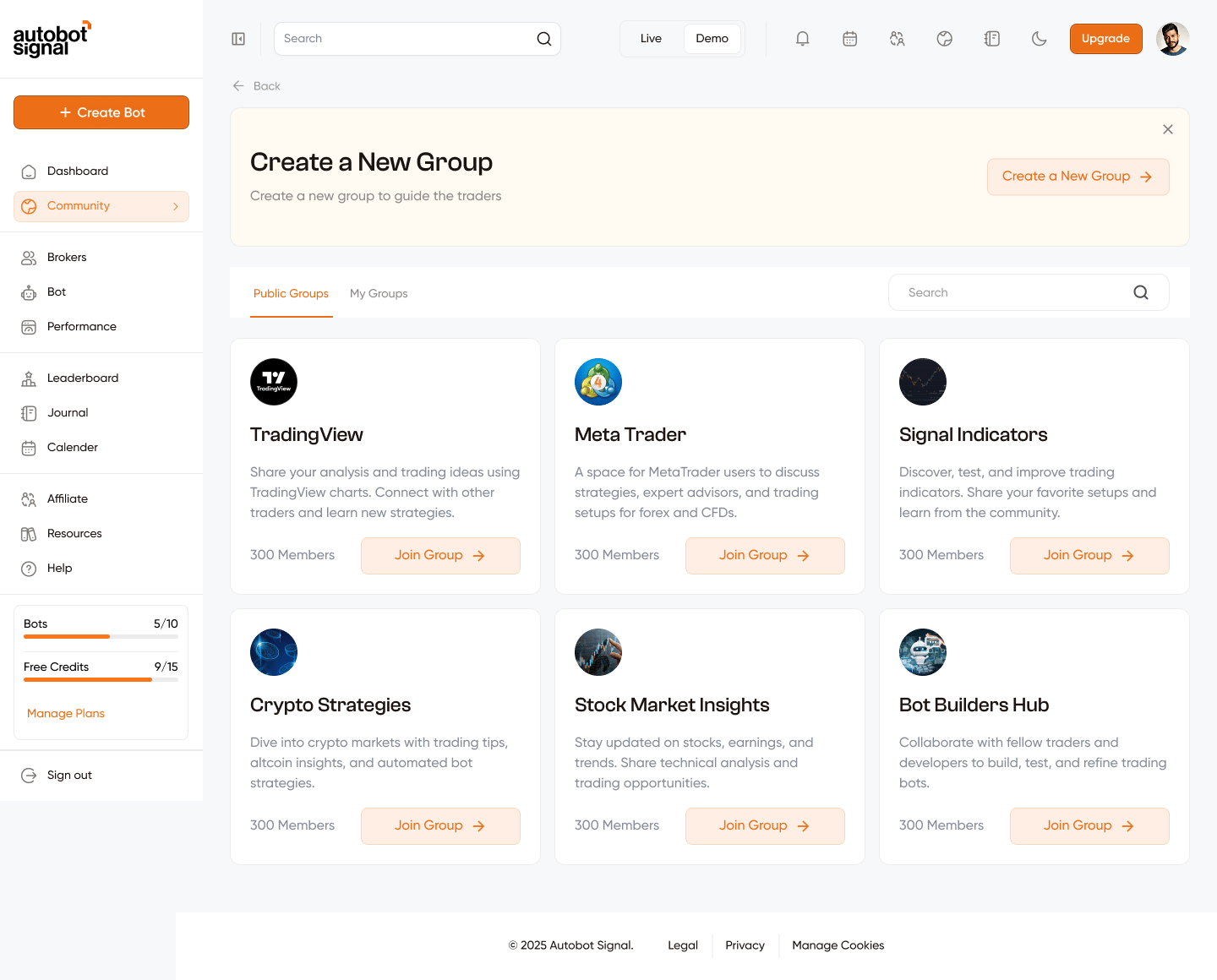 ### Groups Page Layout
```
┌──────────────────────────────────────────────┐
│ CREATE A NEW GROUP BANNER │
│ "Create a new group to guide the traders" │
│ Create a New Group → button │
└──────────────────────────────────────────────┘
┌──────────────────────────────────────────────┐
│ TABS: Public Groups | My Groups │
│ SEARCH bar │
│ GROUP CARDS │
└──────────────────────────────────────────────┘
```
### Tabs
| Tab | Shows |
| ----------------- | ---------------------------------- |
| **Public Groups** | All groups open for anyone to join |
| **My Groups** | Groups you own or are a member of |
### Group Card
Each group is shown as a card:
| Element | Description |
| ---------------- | -------------------------------------------------------------------- |
| **Group icon** | Group's logo or avatar |
| **Group name** | The group's title (e.g. TradingView, Meta Trader, Signal Indicators) |
| **Description** | What the group is about |
| **Member count** | How many members have joined (e.g. 300 Members) |
| **Join Group →** | Button to join a group you haven't joined yet |
### Available Public Groups (examples)
| Group | Description |
| ------------------------- | ------------------------------------------------------------------------ |
| **TradingView** | Share analysis and trading ideas using TradingView charts |
| **Meta Trader** | Discuss strategies, expert advisors, and forex/CFD setups |
| **Signal Indicators** | Discover, test, and improve trading indicators |
| **Crypto Strategies** | Crypto market tips, altcoin insights, and automated bot strategies |
| **Stock Market Insights** | Stock updates, earnings, technical analysis |
| **Bot Builders Hub** | Collaborate with traders and developers to build and refine trading bots |
### Create a Group Flow
```
Click "Create a New Group →"
│
▼
Create Group modal opens
│
Fill in:
- Group image (optional — click "Edit Group Image" to upload)
- Group Name (required)
- Group Description (required)
- Group Type — Public or Private
- Invite Members — enter email addresses one by one
(press Enter or comma to add each email)
│
▼
Click "Create Group"
│
▼
Group created → appears in "My Groups" tab
```
### Group Types
| Type | Description |
| -------------- | --------------------------------------------------------- |
| **Public** 🌐 | Anyone can find and join the group |
| **Private** 🔒 | Only invited members can join — not visible to the public |
### Invite Members
When creating a group (Public or Private), you can invite members by email:
* Type an email address in the **Invite Members** field
* Press **Enter** or **comma** to add it to the invite list
* Added emails appear as removable tags below the input
* Invites are sent when you click **Create Group**
### Edit a Group
If you are the **owner** of a group, an **✏ edit icon** appears on your group card in the **My Groups** tab. Clicking it opens the same modal pre-filled with the current group details — you can update the name, description, image, and invite new members. Group type (Public/Private) cannot be changed after creation.
### Delete a Group
Group owners also see a **🗑 trash icon** on their group card in the **My Groups** tab. Clicking it opens a delete confirmation modal — deleting a group removes it and all its posts permanently.
***
## Individual Group Page
### Groups Page Layout
```
┌──────────────────────────────────────────────┐
│ CREATE A NEW GROUP BANNER │
│ "Create a new group to guide the traders" │
│ Create a New Group → button │
└──────────────────────────────────────────────┘
┌──────────────────────────────────────────────┐
│ TABS: Public Groups | My Groups │
│ SEARCH bar │
│ GROUP CARDS │
└──────────────────────────────────────────────┘
```
### Tabs
| Tab | Shows |
| ----------------- | ---------------------------------- |
| **Public Groups** | All groups open for anyone to join |
| **My Groups** | Groups you own or are a member of |
### Group Card
Each group is shown as a card:
| Element | Description |
| ---------------- | -------------------------------------------------------------------- |
| **Group icon** | Group's logo or avatar |
| **Group name** | The group's title (e.g. TradingView, Meta Trader, Signal Indicators) |
| **Description** | What the group is about |
| **Member count** | How many members have joined (e.g. 300 Members) |
| **Join Group →** | Button to join a group you haven't joined yet |
### Available Public Groups (examples)
| Group | Description |
| ------------------------- | ------------------------------------------------------------------------ |
| **TradingView** | Share analysis and trading ideas using TradingView charts |
| **Meta Trader** | Discuss strategies, expert advisors, and forex/CFD setups |
| **Signal Indicators** | Discover, test, and improve trading indicators |
| **Crypto Strategies** | Crypto market tips, altcoin insights, and automated bot strategies |
| **Stock Market Insights** | Stock updates, earnings, technical analysis |
| **Bot Builders Hub** | Collaborate with traders and developers to build and refine trading bots |
### Create a Group Flow
```
Click "Create a New Group →"
│
▼
Create Group modal opens
│
Fill in:
- Group image (optional — click "Edit Group Image" to upload)
- Group Name (required)
- Group Description (required)
- Group Type — Public or Private
- Invite Members — enter email addresses one by one
(press Enter or comma to add each email)
│
▼
Click "Create Group"
│
▼
Group created → appears in "My Groups" tab
```
### Group Types
| Type | Description |
| -------------- | --------------------------------------------------------- |
| **Public** 🌐 | Anyone can find and join the group |
| **Private** 🔒 | Only invited members can join — not visible to the public |
### Invite Members
When creating a group (Public or Private), you can invite members by email:
* Type an email address in the **Invite Members** field
* Press **Enter** or **comma** to add it to the invite list
* Added emails appear as removable tags below the input
* Invites are sent when you click **Create Group**
### Edit a Group
If you are the **owner** of a group, an **✏ edit icon** appears on your group card in the **My Groups** tab. Clicking it opens the same modal pre-filled with the current group details — you can update the name, description, image, and invite new members. Group type (Public/Private) cannot be changed after creation.
### Delete a Group
Group owners also see a **🗑 trash icon** on their group card in the **My Groups** tab. Clicking it opens a delete confirmation modal — deleting a group removes it and all its posts permanently.
***
## Individual Group Page
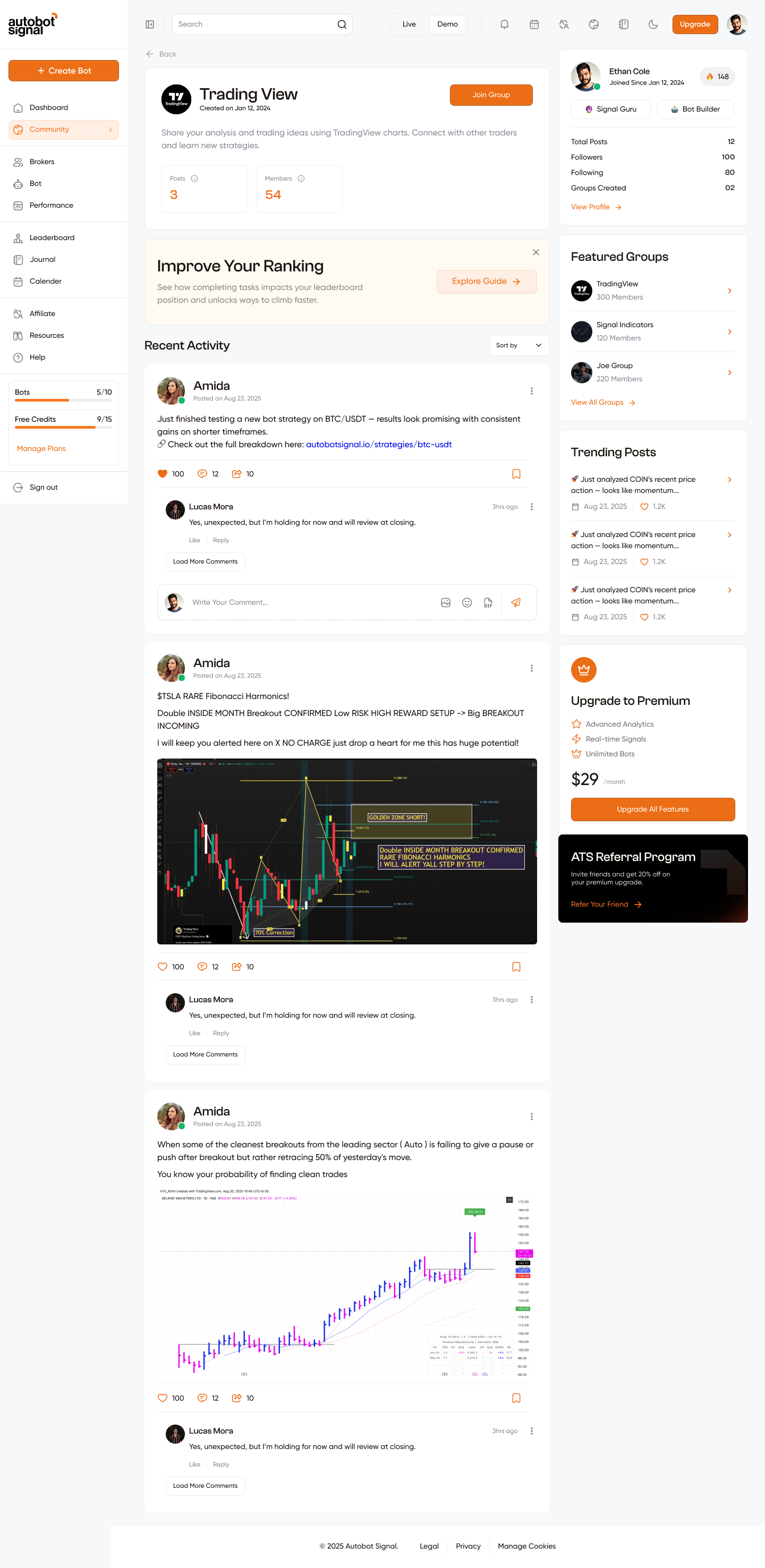 Clicking a group card opens its dedicated group page:
| Element | Description |
| ------------------------------- | --------------------------------------------------------------------------------------------------------- |
| **Group header** | Group icon, name, created date, description |
| **Join Group** | Button to join (if not already a member) |
| **Posts count** | Number of posts in the group (e.g. 3) |
| **Members count** | Number of members (e.g. 54) |
| **Improve Your Ranking banner** | Dismissible banner linking to the leaderboard guide |
| **Recent Activity** | Feed of posts within the group — same post card format as main feed |
| **Sort by** | Sort group posts (e.g. by date, popularity) |
| **Right sidebar** | Same as main feed — your profile card, Featured Groups, Trending Posts, Upgrade CTA, ATS Referral Program |
***
## Community Profile Pages
| URL | Description |
| ------------------------------ | -------------------------------------------------------------- |
| `/community/profile` | Your own profile — your posts, follower count, following count |
| `/community/user-profile/[id]` | Another trader's community profile |
| `/community/saved-posts` | All posts you have bookmarked |
Clicking a group card opens its dedicated group page:
| Element | Description |
| ------------------------------- | --------------------------------------------------------------------------------------------------------- |
| **Group header** | Group icon, name, created date, description |
| **Join Group** | Button to join (if not already a member) |
| **Posts count** | Number of posts in the group (e.g. 3) |
| **Members count** | Number of members (e.g. 54) |
| **Improve Your Ranking banner** | Dismissible banner linking to the leaderboard guide |
| **Recent Activity** | Feed of posts within the group — same post card format as main feed |
| **Sort by** | Sort group posts (e.g. by date, popularity) |
| **Right sidebar** | Same as main feed — your profile card, Featured Groups, Trending Posts, Upgrade CTA, ATS Referral Program |
***
## Community Profile Pages
| URL | Description |
| ------------------------------ | -------------------------------------------------------------- |
| `/community/profile` | Your own profile — your posts, follower count, following count |
| `/community/user-profile/[id]` | Another trader's community profile |
| `/community/saved-posts` | All posts you have bookmarked |